Every endpoint, one signed policy.
AI-TC enforces on the machine making the call, while a fleet has no record of which machines are enforcing. AI Traffic Control Enterprise signs and distributes one policy fleet-wide.
Policy that lives on a laptop is policy nobody can account for. An engineer edits a local rule file and the change is invisible. A contractor's machine falls a version behind and keeps enforcing last quarter's detections while a laptop leaves the managed fleet without the control plane recording its departure. At audit, the honest answer to which machines enforced what, and when, is a shrug. No inventory. No evidence.
AI-TC Enterprise puts the fleet on the record.
AI Traffic Control Enterprise — Fleet control plane
AI Traffic Control Enterprise is the control plane the open engine reports to, running inside your environment. Policy is authored once, signed and distributed to every enrolled endpoint. Each one verifies the signature before it enforces, then reports its version, mode and findings. The forward deployed security engineers who write the controls work against the same console, and what they ship is visible the day it lands.
- 01
Every finding, fleet-wide
A credential caught on one laptop is a fleet problem, not a laptop problem.
Read the Credential Exposure transcript
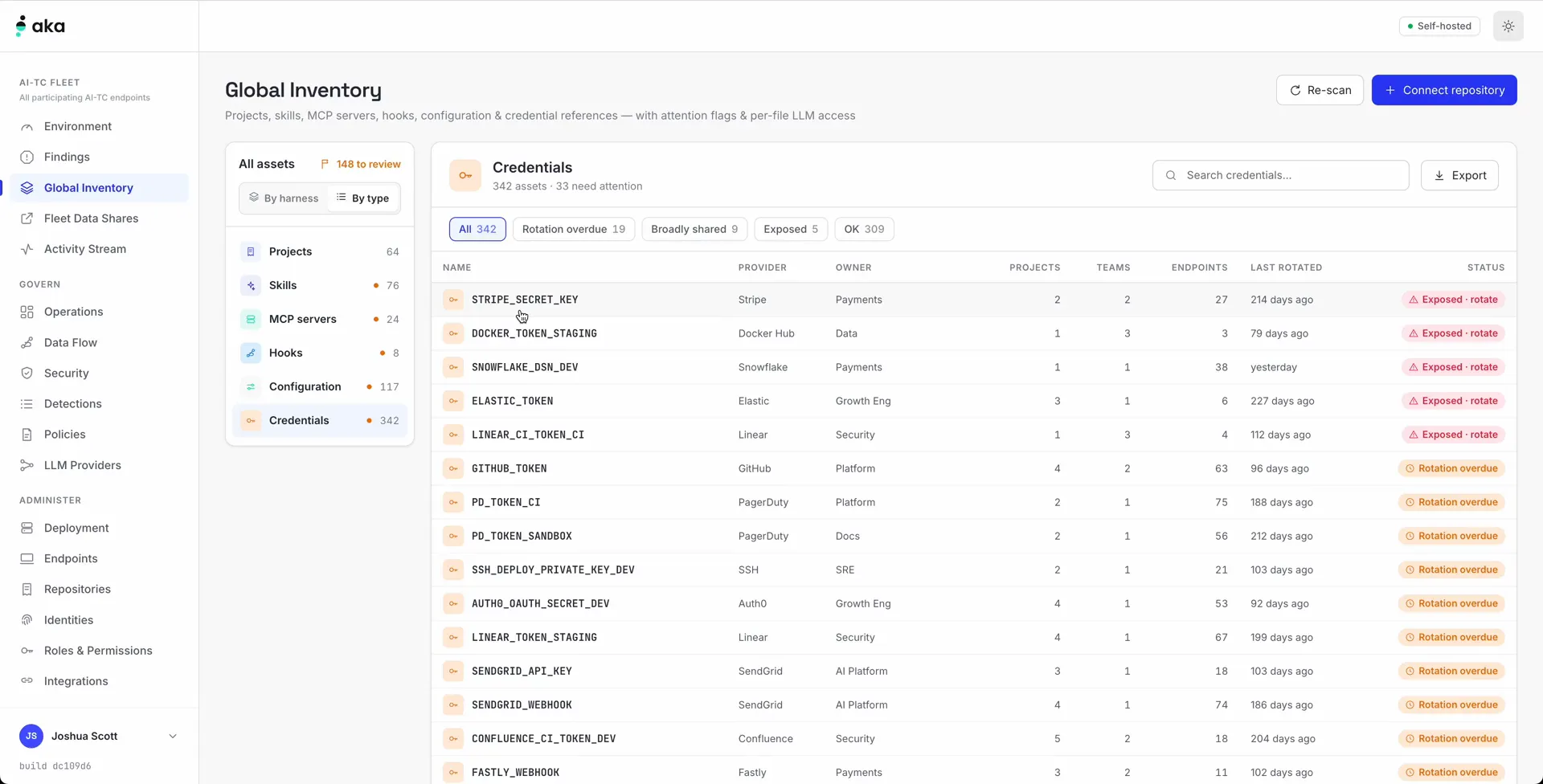
Demo for AKA AI Traffic Control, or AI-TC for short. First, AI-TC is a solution you can deploy in your environment. While the harness plugin is open source, the Enterprise version is something that you can license from AKA. Once you've installed AI-TC in your environment, you'll be able to monitor deployment health and push the AI-TC plugin to all endpoints. Once on your endpoints, you'll be able to monitor what is being done with AI in your environment. First, it takes inventory of everything you have. It looks across the harnesses and by type. That includes all projects running on the endpoints, including correlation and deduplication of shared projects, skills, MCP servers and other configurations. Finally, credentials. Credential exposure looks for cases where a credential may be in the shell, on disk or in the transcript. Credentials exposed in a transcript or through another mechanism to an external party or LLM before AI-TC was installed are brought up as findings. In the overview, you can see which credentials may be at risk and which ones you want to change and rotate. AI-TC also tracks how long credentials have been in use and whether more than one team or project uses them. These could be signals that you need to rotate or split apart the credential at the source. In inventory, you can refine by type and look for potentially risky MCP servers. MCP servers that you haven't approved may be reviewed, then verified or blocked. If blocked, AI-TC prevents the harness on the endpoint from using the MCP server, so the user is unable to send data to it. That's it for this highlight. More highlights follow.
When AI-TC redacts a credential in a prompt, the finding lands in your console with the endpoint, the user, the harness and the rule that caught it. The same secret on four machines reads as one pattern rather than four tickets. Findings carry through to your audit log, which stays in your environment.
- 03
Deployed, signed, attested
An endpoint that cannot prove what it is running is not enforcing.
Read the MDM Deployment transcript
For AKA AI Traffic Control, AI-TC, this demo reviews how AI-TC works with mobile device management. The harness plugin for AI-TC is available as open source. Pushing it to every endpoint requires a connector. After AI-TC Enterprise is deployed, its self-hosted environment connects devices through integrations. Add a directory such as Fleet, Microsoft Intune or Jamf. Connected endpoints appear automatically in the endpoints interface, along with a full inventory of connections. Applications connected through the SDK appear as well and do not have to go through MDM. Each endpoint shows whether its attestation is verified, confirming that the AKA AI-TC plugin is installed and working. The AI-TC CLI provides the base for Claude Code, GitHub Copilot, Codex and browser plugins. Those tools connect automatically and report to the Enterprise server. Configuration remains available through Fleet or another MDM. That is it for today. Another demo follows.
Enrollment goes through the device management the organisation already runs. Each endpoint verifies the signed configuration before enforcing, attests to the build it loaded and reports the result. The console shows enrolled, enforcing and attested as different numbers. In a real fleet, they are different numbers.
The engine is open source.
Install AI-TC on one machine, or read the source before adding the fleet layer.
# In the Claude Code CLI
/plugin marketplace add akasecurity/marketplace
/plugin install ai-tc@akasecurity
/aka:setup
# or the local-first CLI (macOS / Linux)
curl -fsSL https://akasecurity.io/install.sh | sh
aka initPut the fleet layer to work.
Review enrollment, policy distribution and attestation against your fleet.
Book an AI-TC Enterprise call